
• Skip to primary navigation
  • Skip to main content
  • Skip to footer

Taskform: Flexible mobile apps for your business software

|

+31 (0)23-2340999

|

info@taskform.nl

|

Knowledge Base

|

Remote Support

|

My Account

|

LOG IN

Logo Taskform

TaskForm

Flexible mobile apps for your business software

  • Home
  • TaskForm platform
    • TaskForm Data Connector
    • TaskForm Appbuilder ™
  • Examples
    • Werkbon app
    • Werkplekinspectie app
    • Urenregistratie app
  • Pricing
  • Blog
Sign Up Free

How do I connect my account to Google Drive/Spreadsheet/Dropbox/FTP/OneDrive etc?

Taskform > FAQ & Troubleshooting > How do I connect my account to Google Drive/Spreadsheet/Dropbox/FTP/OneDrive etc?
Skip to main content

Search Knowledge Base by Keyword

Filter by Categories Clear Results

You must first create a Connection for the target service.

Connections are setup at organisation level and thus apply to all connectors that you create in the organisation account. 

Ensure you are logged in as an administrator in your organisation account on the secure website, then go to Your Connect Data -> Connections.
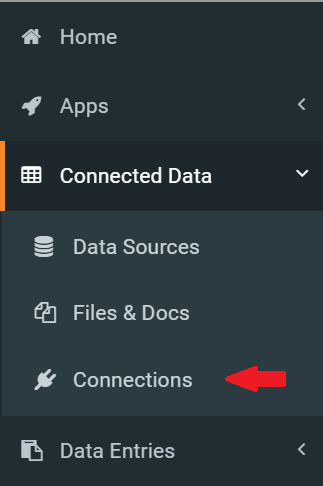
In the Connections page, use the “Add Connection” button on the right hand top of the page to select your desired service to connect to.

You will need to enter various authentication details and other configurations depending on what external system you are connecting to.

Once you have a working Connection for the desired service, you can then go ahead and create connectors via the Screens and Data Sources areas.

Interested to see what TaskForm
can do for your company ?

Leave your details and try our app 30 days for free.

Footer

Blog

  • New features 2020
  • New: Proteus app on the TaskForm Platform
  • TaskForm synchronization via commandline

Support

Knowledge Base
Contact

Contact

info@taskform.nl
+31 023 2340 999

App store downloads

Download-Taskform-Android-app Download-Taskform-Apple-app