
Search Knowledge Base by Keyword
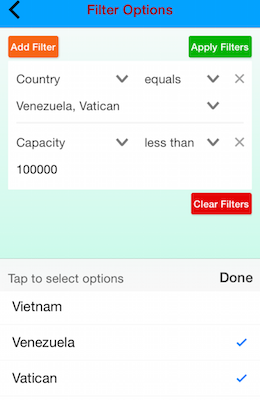 If you have large Data Sources or require more advanced options for data enquiry, then you should consider allowing app users to filter data displayed in Listing and Mapping screens.
This is done by simply checking the “Allow Filtering By Column” box in the relevant Listing & Mapping screen designers.
Once filtering is enabled, a new icon appears on the app in the search box of the Listing and Mapping screens.
Tapping on the icon will take the user into a new app screen that lets them add up to 3 custom filters which will then be applied to the data.
Filters are now also “sticky” in that they are remembered by the app on subsequent screen opens.
The display of the filtering input fields is also dynamic based on the data type of the column as setup in your Data Source -> Rows page on the secure website.
This way the app will ensure that the correct data type is entered by the user.
If you want to display a specific set of filter option for a column (as opposed to the user typing in their search text), then use the “Referring Data Source” option found in the Advanced Column Properties dialog of the Data Source -> Rows page on the secure website.
To learn more about this and other Advanced Column Properties, see our dedicated support article in the same section of our documentation as this article.